
Did you know that many of your standard smart gadgets can be used for an added layer of security when traveling away from home? Alexa-enabled devices, your WiFi router and even your old iPhone or Android device can monitor safety when away. While a proper home security system is the best first line of protection, these new features can add depth and dimension to your existing security systems or provide monitoring in a pinch.
Xfiniti Router – WiFi Motion Feature

Using your home’s WiFi signal, the WiFi Motion feature creates with your Xfiniti router creates motion sensing between internet-enabled devices. It uses the signals traveling between the router and different gadgets to detect motion, as movement disrupts the signal between selected devices. If a disruption is created in the sensing area you create, a push notification is delivered, providing additional peace of mind.
Note that your home size, layout and home’s building materials can affect the device’s ability to pick up movement. The feature works best in areas where you have strong signal, as well. You can use up to three WiFi-connected devices to create motion sensing areas in your home.
If you have pets, you can elect to exclude pet motion by turning on the “Exclude Small Pets” feature. And create “home mode” to disable notifications for when you know the house is occupied.
Comcast does not monitor the motion and/or notifications generated by the service. But this feature, when enabled, gives an added layer of protection since home alarm services can be hacked or bypassed. The feature is currently free.
Alexa Emergency Assist
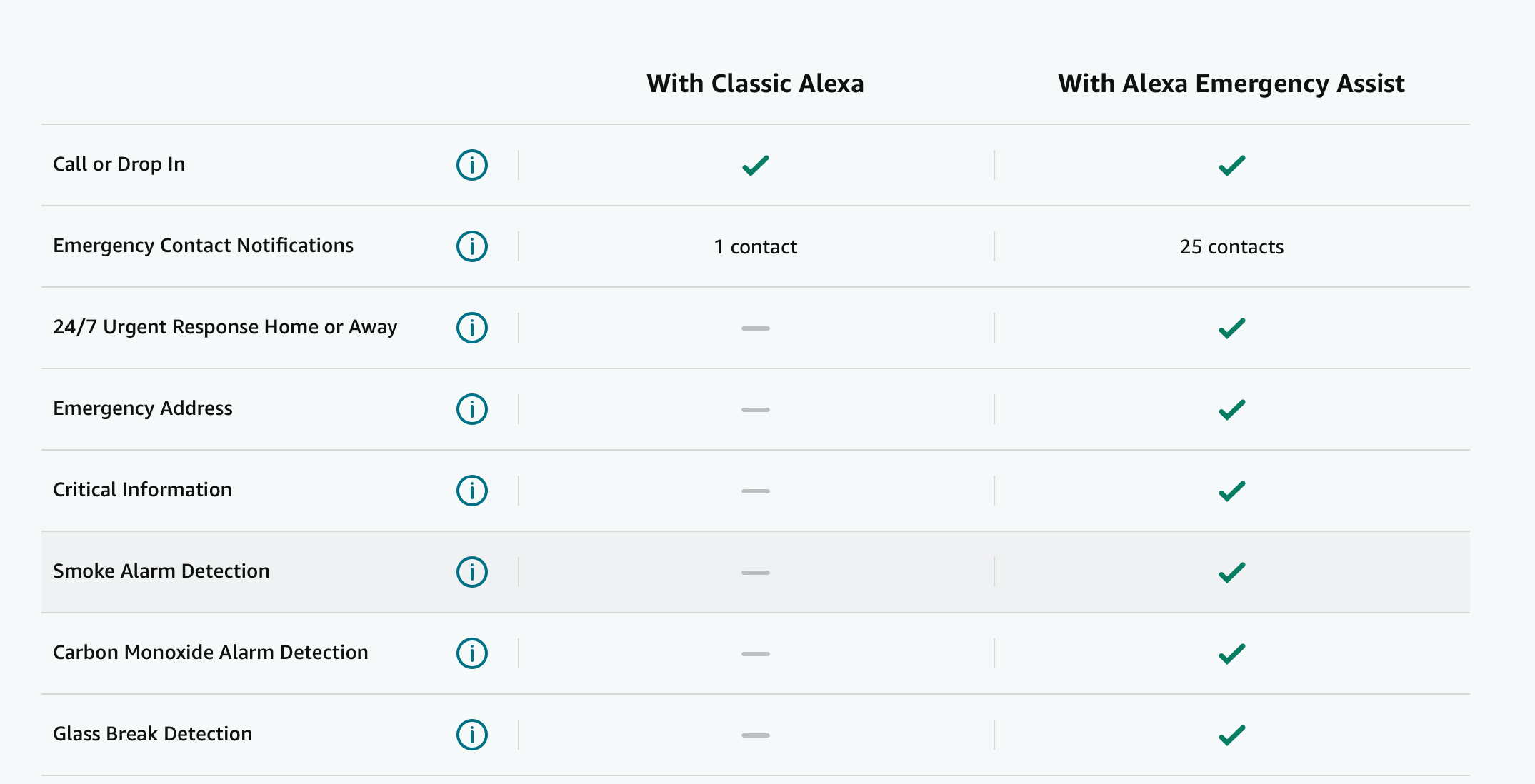
Emergency Assist is a subscription available through Amazon with a handful of features to help provide emergency monitoring while at home and away. With this feature, your Alexa can detect activity while you’re away from home — like footsteps, a door closing, or glass breaking — she can send you a Smart Alert mobile notification and play a siren on your Echo. Alexa can also notify you about the sound of smoke alarms or carbon monoxide alarms. As an added feature, you can play back sounds heard and request emergency services.
There are both free and paid emergency services available through your Alexa devices which you can enable and explore in your Alexa app. They include:
Alexa Reminders
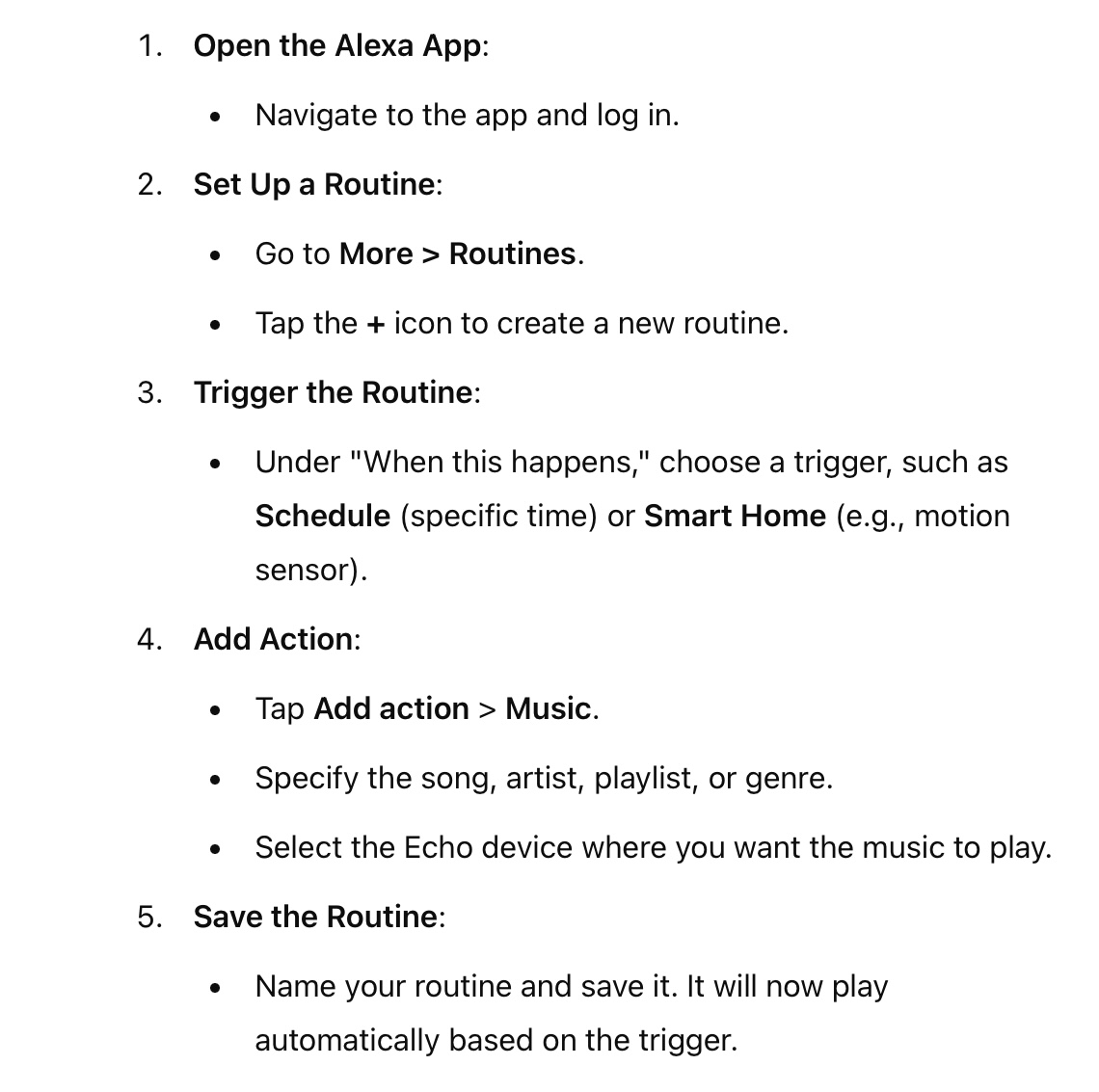
Use Alexa Reminders to create the perception of activity in the home by automatically playing music, turning on lights or turning off your Fire TV at scheduled times when you’re away. Sunrise and sunset timers can also be used to automate home activity. Based on what devices and services you have subscribed to, you can enable a number of choices.
To set up a routine to turn on music or TV:
Convert Your Unused Phone or Tablet Into A DIY Security Camera

Various home security apps allow you to turn your phone into a DIY camera while away. If you have a few phones you can set up multiple cameras for more complete home coverage. The software turns your old phone’s built-in camera to create a livestream.
For these devices to work well, stable WiFi, a ongoing power supply and good lighting are key. You should also mount these devices on a tripod, as well.
To change your device into a home security camera (or baby monitor), download these apps such as AlfredCamera, Manything or Presence. Many offer free features and additional ones for a fee, including motion detection, two-way audio and cloud recording to mimic Ring or security cameras.
When used in combination, these smart device enhancements can provide a more robust and comprehensive solutions to home security – or provide better monitoring than having no security solution at all.