
As we flip the calendar, many of us are making resolutions. We promise to hit the gym or eat healthier. But what about our digital safety? Our online lives are more exposed than ever. I believe our digital privacy and settings deserve their own New Year’s resolution, each and every year – especially with AI ubiquity and our digital footprints growing.
Complacency, too much reliance on big tech and our ABC123 passwords create vulnerability. So, as the new year turns, check out these 5 simple and powerful actions that protect your data, your privacy…and your peace of mind.
1. Boost your AI protection on social media and chatbots
Every platform you can think of is incorporating AI into their interfaces. With that change comes the training of their models on YOUR data. Instagram, LinkedIn and Gmail are a few of the names folding in AI into our daily habits and, if we’re not proactive, the sites will use our information in their models. See what LinkedIn is doing here and how to disable features.
A recent Stanford study showed that enough isn’t being done to safeguard our data on AI platforms, especially chatbots. According to Stanford’s Human-Centered Artificial Intelligence (HAI):
“We depend on the AI companies to remove personal information from their training data or to set guardrails that prevent personal information from coming out on the output side. And that’s not really an acceptable situation, because we are dependent on them choosing to do the right thing.”
We assume that AI companies are safeguarding our data to prevent our personal information from being trained – but there are really no guardrails guaranteeing this.
Experts say we should treat AI chatbots as if they are public environments. With that, here are some tips to stay safe on AI Chatbots:

2. Safeguard your personal details online
As I have written about before, your name, address, birthday and even your browsing history are out there, being scraped off the web and sold to a network of data brokers and unsavory characters. This data is used for identity theft, phishing scams and other online mayhem. Thanks to AI, once your data is retrieved, executing cybercrimes is even easier.
A good place to start is in our better guarding of personal data as a first layer of defense. If our personal data (birthdate, social security number, phone number, etc.) are on the web, it’s easier to be misused. In cleaning up your Google search results, you protect yourself.
Read more on steps to take on Google here.
3. Change your search engine
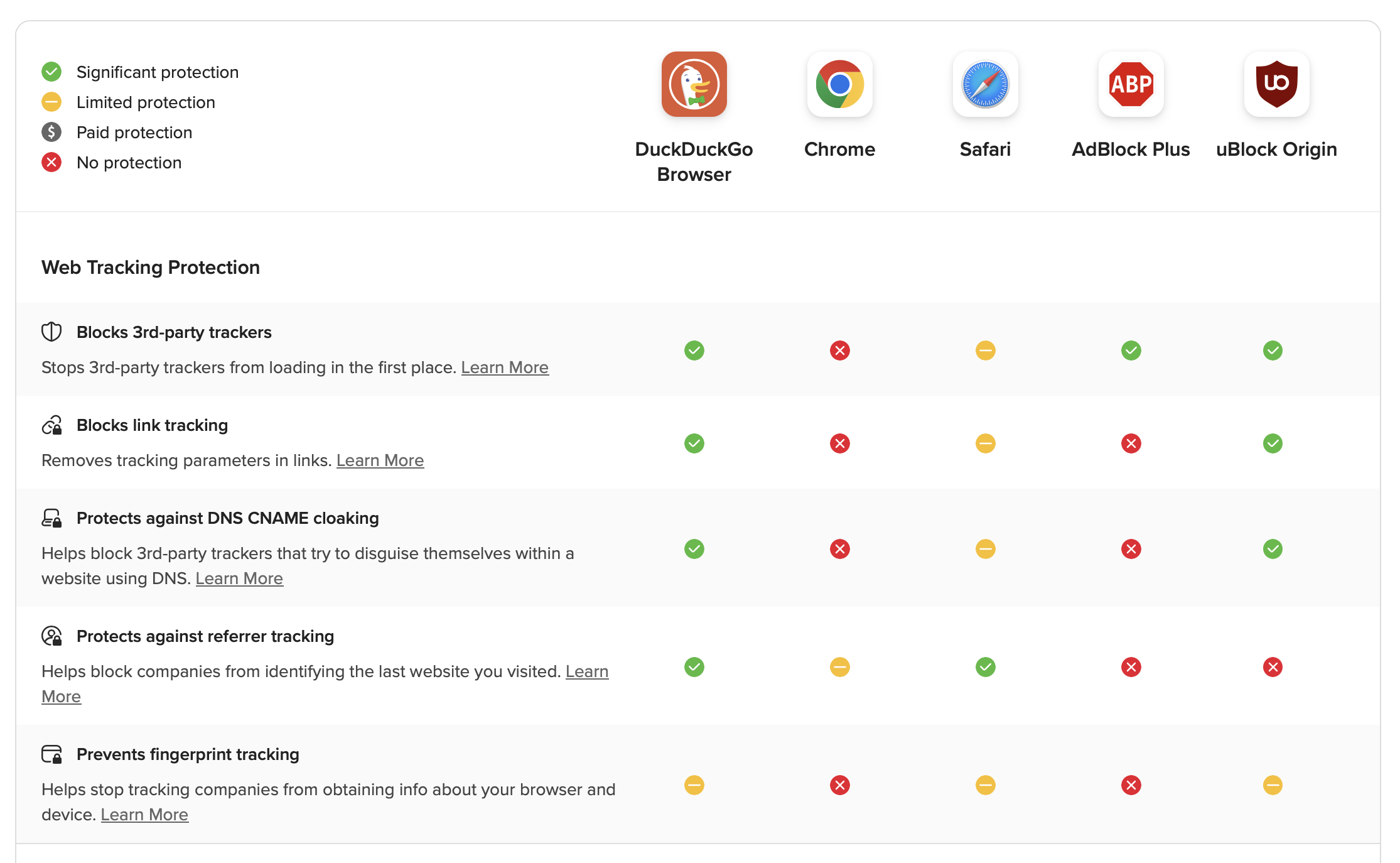
Even with settings adjusted, your search browser could be a culprit in exposing your data, too. I use DuckDuckGo, which works just like any other search engine (like Chrome or Safari) without saving your searches or selling your information to advertisers. I use it on my iPhone and MacBook.
As of June 2025, there have been no major publicly-disclosed hacks involving DuckDuckGo products or infrastructure, nor have there been any leaks or breaches involving DuckDuckGo user data on the dark web, according to Norton.
Learn more about DuckDuckGo here.
4. Change passwords and enable 2FA
Though obvious and perhaps tedious, password changes are the best first line of defense.
81% of confirmed breaches were due to weak, reused, or stolen passwords in 2022, according to LastPass. And AI will only push that figure higher. 16% of all breaches in 2025 involved attackers using AI, via IBM.
Think you’re safe because you have an autogenerated strong password? Leaving your password unchanged can lead to account take overs, identity theft and financial loss. Complex passwords can create a false sense of security, as two-factor authentication (where you get a text message or email code) is the current gold standard.
Make sure you have both enabled – a new password and 2FA – especially for bank accounts, social media and other highly sensitive accounts.
To easily change your passwords, use a password manager to fill them in automatically on websites.
5. Check who is on your Wi-Fi

When was the last time your updated your Wi-Fi password? Not recently? You’re not alone.
A survey by ExpressVPN found that 38% of people change their Wi-Fi passwords regularly. Even with a secure password, your Wi-Fi could be hijacked by hackers or run hidden malware in the background. This can happen when you download and install a new app. Some apps can collect your data without your approval.
Read on how to keep your Wi-Fi router safe with some easy steps.
Short on time? Stagger these steps across the month. Anytime you address your digital health, you do good for yourself. Bookmark this article for the future and come back to it annually.
Here’s to a healthy and happy digital life in 2026!