
If you’ve watched the AI conversation from the sidelines or as a beginner, consider this your sign to step in. In Part 1 of a series, Shibani shares her own experiments with, the system requirements, the case for a paid subscription, and small ways to start with expanding using AI to harness more of its potential.
If you’re reading this, chances are that you are pretty comfortable using AI. Perhaps you use it to answer questions or create email drafts. I do the same. I use different platforms like ChatGPT and Gemini to experiment with what one can do over the other. I use AI as an “oracle” where I ask it to generate interview questions for a specific role I am coaching for or generate an outline for an upcoming talk, for example. In 2024, I had it generate a roadtrip map for me to the Grand Canyon and that trip was incredible.
But in 2026, the power of AI is so much more. Are you fulling tapping into it? In part one, I share more about getting set up to be more engaged with AI and tasks I’m doing.
What’s in it for you?
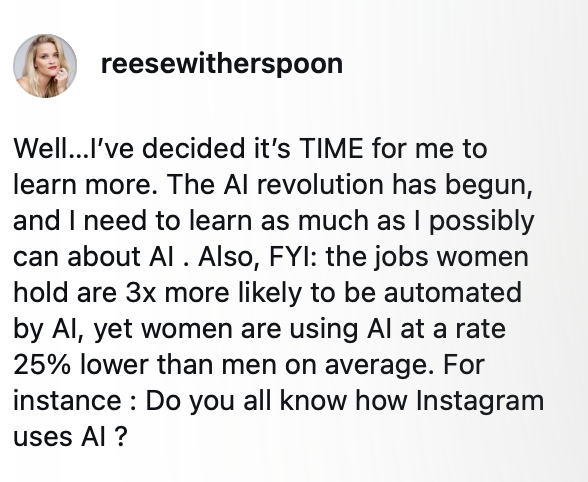
As a woman and in my work, it is essential that I get on board and develop strong comfort with AI. Reese Witherspoon recently took some heat for her encouragement on Instagram of more women using AI. Frankly, I agree.
Yes, we have some major ethical and environmental issues to consider in the ramping of AI. There are more conscious ways of using AI, like turning to Google search for mundane searches as an energy saver, or using tools that have more ethical practices. More on that in my series.
To wait for these to be resolved, however, puts women at a disadvantage. A widening gender gap in AI adoption has created a rare on-ramp for women who never thought of themselves as “tech people.” Our jobs could be more at risk because of AI and our tendency to experiment with it is less.
Leadership is also changing for both men and women, requiring those in senior leadership or managerial roles to adapt. More of us will develop hybrid workforces composed of human and agentic teams. This will change how we lead, something I explored in a recent talk with Salesforce.
The risk isn’t theoretical. AI fluency is quickly becoming a hiring filter and a promotion lever. Workers who can leverage AI are producing more in less time — which translates to visibility, raises, and new opportunities. Women who skip this wave will be competing against colleagues who have effectively unlocked a 20-30% productivity multiplier.
So, for any professional and women, in particular, we are positioned to gain the most and lose the most depending on how we engage with Ai now. You have the experience employers want, but the pace of AI adoption is rewriting what “experienced” looks like in real time.
In this spirit, I decided to dive in and further experiment with AI – with vibe coding, training an AI model and asking AI tools to create new outputs. Along the way, I’ll chronicle here what I’m doing, learning and experiencing, so you can follow along with me and play in your own way.
Where’s the missed potential with AI?
My experimentation was inspired by a Stanford GSB webinar run by students. It opened my eyes to how limited my usage of AI’s potential is in the way I use it. Most of us use AI as a replacement to Google. We ask it to research and capture information for us.
With the right tools and prompts, I learned that you can take it from a search partner to a creative engine to generate memos and slide outlines – and – if you really do it right – an operator that plans, uses tools, inspect results like a co-worker or personal assistant.
The opportunity is moving from search partner to creative agent to an employee.

I created this graphic in Gemini’s Nano Banana. I don’t love it, but this is the experiment.
In harnessing more of AI you need to first pick the LLM you want to work with, train the model, fine tune your prompts and experiment until you figure out what roadblocks you run into. No employer is going to train you or teach you how to do this – this is your job.
But first: what is “vibe coding”?
To begin, I wanted to understand the difference between using AI and vibe coding in AI. Vibe coding was coined in early 2025 to describe a new way of building software: you describe what you want in plain English and AI writes the code. You don’t have to read it, debug it or even understand it, which I don’t. You just check whether it does the thing you asked for. This application of AI is what is replacing computer science jobs.
What does it enable you to do? People with zero programming background are building working apps, automations, and personal tools by talking to AI tools like Claude, ChatGPT, Cursor, and Replit.
In the way I am using AI, I don’t plan to do much with code. Though, in initial tests, I ran into the need to copy and paste code into different platforms. I am not yet sure if that is because I did not give full access to my computer and applications or that is necessary in doing more with AI. I generally worry about the privacy aspect of AI, as well. I’ll be exploring that more in my series.
The “vibe” is the loop: describe → run → tweak → describe again.
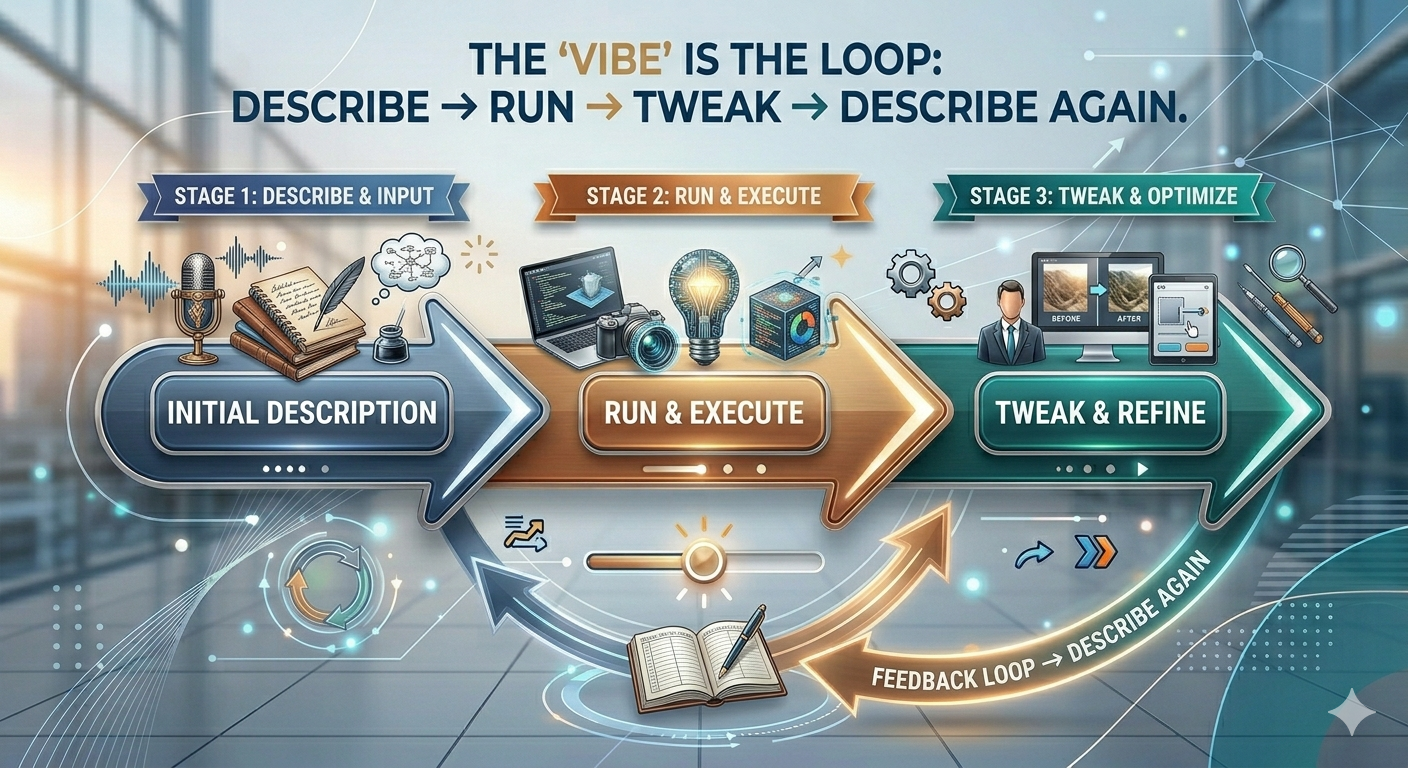
I created this graphic in Gemini’s Nano Banana. I don’t love this either, but it was better than the first versions.
What you need to get started
The system requirements are almost trivial — and that’s part of the point:
- Reasonably modern laptop or desktop. Anything from the last five or six years is fine. Chromebook, MacBook, Windows PC — doesn’t matter.
- Web browser. Most of the major AI tools run in any browser or an app.
- Subscription to at least one AI tool. More on that below.
- Willingness to feel awkward. This is the actual hardest requirement.
- Beginners mindset. Take a class, watch a video, read a Substack and train yourself.
You don’t need a developer machine, a specialized operating system or any technical setup. If you can use Gmail, you can use Claude, ChatGPT or other LLMs (large language models).
Why pay for a subscription?
The free tiers of Claude, ChatGPT, and Gemini are useful for casual questions, but they aren’t where the productivity gains live. Paid plans run around $20 per month and unlock three things that matter:
- Access to the newest, most capable models. Free tiers usually throttle you to smaller or older versions. The quality gap between a top-tier model and a free one is significant…and you feel it.
- Higher usage limits. Free tiers cut you off after a small number of messages. You’ll hit that wall fast once you start using the tool frequently.
- Features like file uploads, longer memory, and integrations. This is where AI shifts from “chatbot” to “assistant.” Claude Pro, for example, includes projects and connectors, meaning the AI can read your documents, calendar, or email if you let it.
I treat the $20 the way I treat a streaming subscription: a small monthly cost for a tool I’d be embarrassed to be without. If the productivity lift saves you even one hour a month, you’re net positive. I hope to have a high ROI with this tool over time. Right now, it’s just a Google replacement.
Enable privacy settings first
Once you decide what model you plan to experiment with, watch a video on how to choose, know that putting the same prompt into different, free models, is always recommended. No matter what you choose, be sure to set up privacy controls first:
The “Big One”: Opt Out of Training
By default, Anthropic may use your conversations from Free and Pro accounts to train their models. You must manually disable this by toggling OFF improvements to Claude.

Use “Incognito Mode” for Sensitive Tasks
Claude now offers an Incognito Mode (look for the ghost icon in the top right of a new chat). Chats started in this mode are never used for training and have a significantly shorter retention window. BUT, these chats aren’t saved to your history, so if you refresh the page, the conversation is gone. So weigh this carefully.
Practice “Data Minimization”
No AI is a vault. Even with training turned off, Anthropic employees may still access flagged chats for safety reviews (to ensure you aren’t violating terms of service).
- Anonymize: Instead of “John Doe at Acme Corp,” use “Client A at Company X.”
- No Secrets: Never paste API keys, passwords, or sensitive medical/financial records.
- Clean House: Periodically delete old chats you no longer need.
My experiments with Claude so far
Because of ethical considerations and what I am seeing students use at Stanford, I decided to download Claude to what it can do, treating it less like a search engine and more like a junior collaborator. Two recent experiments:
- Tone analysis for my own writing. I gave Claude samples from two of my sites — boldly-forward.com (reflective, personal) and shibaniontech.com (consumer tech) and asked it to map the differences. In two passes, it produced a working profile of each voice, complete with sentence-level observations I hadn’t articulated myself. This helps the LLM know my voice. I also shared drafts of emails and writing samples.
- Outline for a talk on redefining success for women. I drafted the structure for a keynote by talking it through with Claude, feeding it the audience, the themes, and what I wanted attendees to walk away with. The outline that came back wasn’t perfect, but it was about 70% there in under an hour. That’s an evening saved.
Neither task required code. Both, in spirit, are vibe coding: I described what I wanted in plain English, and the AI handled the assembly.
Early learnings
While Claude analyzed my tone and was able to help me generate and outline, it failed or was frustration in a few areas:
- Specific prompts matter – in the beginning, I found that the output I was getting was too generic or was off the mark. I learned that giving shorter prompts helped. I also “trained” it separately on my tone as a different prompt and exercise. Breaking prompts into chunks helps get better output.
- Running into code and lack of connectivity– In trying to generate Google slides from my outline, I was asked to copy JavaScript code into script.gooogle.com to then generate slides. Claude explained that it was because my permissions were blocking it from taking next steps. I wasn’t clear on how to give permission, nor whether I wanted to, for privacy’s sake. So, I abandoned my efforts and went to Gamma.app, where I make slides these days.
- Confusion on what skills, projects and tasks are – this is the next frontier for me. Experimenting with what should be a chat, task, skill or project and when to use one versus the other.
What you can try this week
Pick the smallest possible experiment. Some starting prompts:
– “Help me plan dinners for the week using what I have in the fridge: [list items].”
– “Read this email I’m about to send and rewrite it so it’s firm but warm.”
– “I’m thinking about [career idea]. Ask me 10 questions that will help me figure out if it’s worth pursuing.”
– “Analyze my calendar to help me rearrange my schedule to prioritize high value tasks from 9-11am.”
If one works, try another. That’s vibe coding for daily life — and the on-ramp to everything bigger.
Coming next from me
As I experiment more, I will share learnings about how I am using AI in my life, what I am building and how I am handling my concerns around environmental cost, privacy and biases.