
In Part 2 of her AI series, Shibani uses Claude to build a financial forecasting model for personal budgeting and retirement savings — and shares 4 rules that made the difference between a mediocre first draft and a tool she actually trusted with real decisions.
I’m not a finance whiz, but I know enough to be a little dangerous. I also had real financial decisions coming up that I wanted to model. Rather than starting from cell A1 in Excel, I decided to build the model with Claude instead, using it as a way to learn how far AI could actually take me on something that mattered.
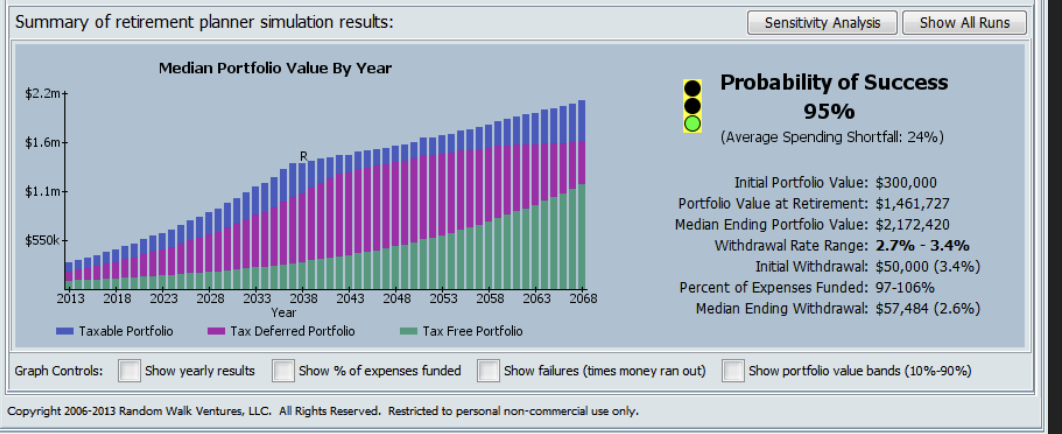
I had a PDF model from my financial advisor to use as a starting point and a benchmark — something to check my results against for peace of mind.
My building roadmap:
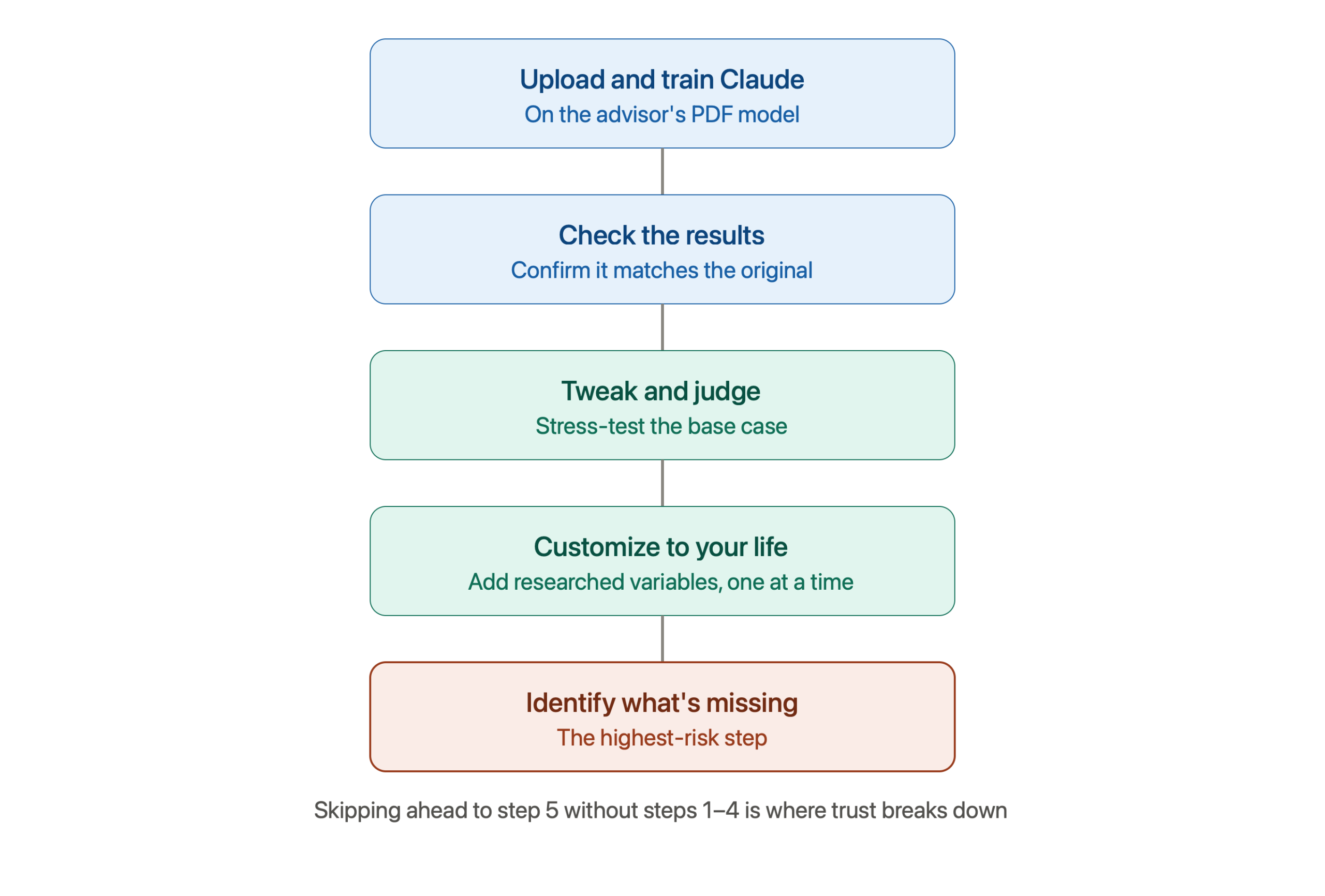
Here’s what I learned along the way.
Learning 1: Train the model before you prompt it
My first instinct was to just upload the PDF and see what Claude did with it. I quickly learned that fixing a bad first draft is much harder than getting it right from the start. Claude doesn’t read your mind; if you don’t tell it what matters, it guesses.
Before you start a project like this, spend a few minutes training Claude on:
- Who you are and what you want. Claude doesn’t remember past conversations by default, so restate your context each time — or better, save it so you can reuse it.
- The exact output you want. Don’t just ask for “a financial model.” Ask for a dynamic model with a specific list of inputs (salary, investment income, growth rates, retirement year, etc.). Adding inputs after the fact was clunky and gave me errors.
- What to research first. I had Claude research the key variables and failure points in retirement models before building anything. That upfront research helped me catch things — like the risk of a market downturn — that I would’ve missed.
Learning 2: Get the base case right before you customize, then change slowly
Once I’d trained Claude, I went back to my advisor’s PDF and asked it to walk me through its assumptions — things like expected stock market performance year by year. In about 10 minutes, Claude produced a base model that closely matched the professionally-built one, including some fairly sophisticated techniques (like Monte Carlo simulations) it recreated without ever seeing them. I really was astounded at what Claude was able to do in search a short time.
I stress-tested this base case extensively — changing inputs, checking outputs — before touching anything personal. Only once I trusted the foundation did I start layering in my own variables, one at a time, so I could see exactly how each change (like retirement age) rippled through the model.
It’s much easier to spot when something breaks if you’re only changing one thing at a time.
Learning 3: Weak prompts give weak results
Another takeaway was that the clearer and more specific I was upfront, the better Claude’s output. Asking it to map out low/medium/high stock market scenarios from the start produced a far better model than asking it to add that on later. This is why research and doing a deep dive into a topic is important upfront for the user. Don’t rely on AI to think for you. Here’s an article on prompting better.
What helped:
- Ask Claude to explain its assumptions before you trust the output. “What growth rate are you using, and why?” is a simple question that catches a lot.
- Give Claude a role. Asking it to act as a financial analyst reviewing your model for accuracy changes the rigor of its answers.
- Start over when needed, rather than trying to argue a bad output into a good one. It’s often faster to open a new conversation with a clearer prompt than to keep repairing.
Learning 4: Correct with specificity
When Claude gets something wrong, vague feedback doesn’t fix it. You have to name exactly what’s wrong, explain why, and — if it’s a nuanced topic — point it to a source. Precision in, precision out.
Learning 5: Ask Claude to find mistakes
Before finalizing anything, ask Claude to poke holes in its own work: “What could be wrong with this model? What am I not accounting for?” This is what turned my project from a decent spreadsheet into something I actually trusted (and used) for decision-making.
A decent model, thanks to team effort
I did effectively co-create a model with AI that worked pretty well (that was based on something I trusted). Still, because I wasn’t in full control of the iterations to the model nor sure I prompted perfectly, I didn’t fully trust it. I don’t think AI will steal the day jobs of financial advisors anytime soon.
My biggest take away with this experiment is that building in AI requires the user to be able to train, examine and correct all the output of AI. The role of human critical reasoning is essential. Often we don’t have that expertise, time or desire, though, to use it. So, you can’t fully trust the output. Still, the promise AI holds for doing things that once took humans countless hours still blows me away.